

Up to 71% of resumes never reach a human recruiter because they fail automated screening systems. That number should stop you cold. The good news? A well-chosen resume template isn't a lazy shortcut. It's a strategic tool built to clear those digital gatekeepers and land your application in front of the people who actually make hiring decisions. For students and early career professionals, the right template does something even more powerful: it structures your education, skills, and projects in ways that make limited work history look like a genuine asset, not a gap.
Table of Contents
- Why resume templates matter for students and early professionals
- ATS-friendly templates: Your secret weapon
- Choosing the right template style: Functional vs. chronological
- Customizing a template: Stand out, don't blend in
- What most guides miss about resume templates
- Build a standout resume with premium templates
- Frequently asked questions
Key Takeaways
| Point | Details |
|---|---|
| Templates highlight student strengths | Optimized designs focus attention on your education, skills, and projects instead of limited work history. |
| ATS compatibility is vital | Using ATS-friendly templates makes your resume readable by hiring software and increases your interview chances. |
| Customization is non-negotiable | Always personalize templates with job-specific details and keywords to stand out from other candidates. |
| Choose the best style | Select functional or skills-based templates to best display your student and early-career achievements. |
Why resume templates matter for students and early professionals
Let's get something out of the way first. Using a resume template is not cheating. Every polished, professional resume you've ever admired was built on some kind of structure. Templates simply make that structure visible and accessible to everyone, regardless of design experience.
For students and early career professionals, the challenge is real. You're competing against candidates who may have years of work history, while you're working with internships, class projects, and extracurriculars. A blank page doesn't help you here. A well-designed template does.
Here's what templates actually do for you:
- Save time. Instead of agonizing over margins, font sizes, and section order, you start with a proven layout and focus on content.
- Eliminate formatting errors. Misaligned columns, inconsistent spacing, and odd fonts are common rookie mistakes that templates prevent automatically.
- Highlight what matters most. Templates provide pre-formatted structures optimized for students, emphasizing education, skills, projects, and extracurriculars over limited work experience.
- Give you a professional baseline. Even if you have zero design skills, a quality template makes your resume look like it was built by someone who does.
Universities have recognized this for years. Templates enable quick, professional resumes without design skills, and institutions like Princeton and OSU provide free ones as starting points for exactly this reason. You can also explore student template resources from Princeton's career development office to see what a strong academic foundation looks like in practice.
"The best resume isn't the most creative one. It's the one that gets read."
When you use AI resume templates built for modern job seekers, you're not just saving time. You're applying decades of recruiter feedback into a format that works. That's not lazy. That's smart.
ATS-friendly templates: Your secret weapon
Here's a fact that should change how you think about resume design: 87% of employers use ATS to screen applicants before a human ever sees your resume. ATS stands for Applicant Tracking System, and it's essentially software that reads, parses, and ranks resumes based on keywords and formatting.
The problem? Many resume designs that look stunning to the human eye are invisible to ATS software. Multi-column layouts, graphics, icons, and unusual fonts can all cause parsing failures. When a system can't read your resume correctly, it either misfiles your information or drops you entirely.
ATS-friendly vs. non-ATS templates: What's the difference?
| Feature | ATS-Friendly Template | Non-ATS Template |
|---|---|---|
| Layout | Single column | Multi-column |
| Headings | Standard (Experience, Education) | Creative or custom labels |
| Fonts | Arial, Calibri, Times New Roman | Decorative or script fonts |
| Graphics | None | Icons, photos, charts |
| Pass rate | 85 to 98% | As low as 40% |
| Common mistake | Overly plain appearance | Looks great, reads poorly |
ATS-friendly templates use single-column layouts, standard headings, and simple formatting to ensure 85 to 98% parsing accuracy across major systems like Workday and Greenhouse. Switching from a flashy multi-column design to a clean single-column layout can boost parsing accuracy by as much as 18 percentage points.
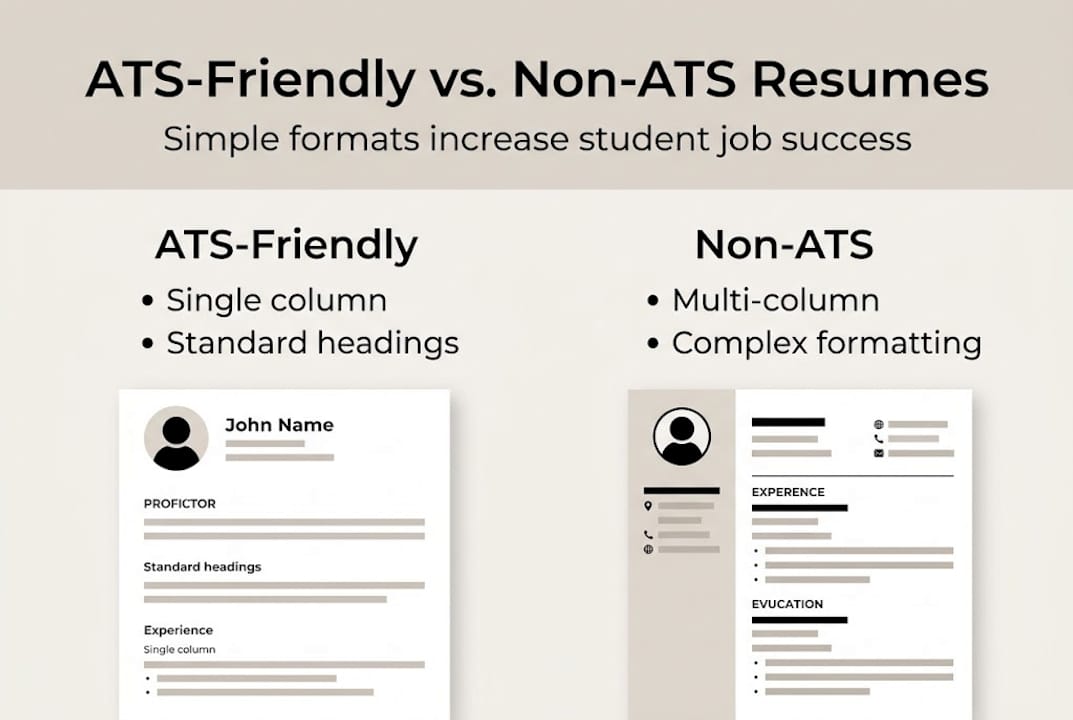
Pro Tip: Before submitting your resume, run it through a free ATS checker tool online. Upload both your PDF and Word versions to see how the system reads your content. If key skills or job titles are misread, your template may need simplification. A minimal ATS-ready design or a Brutalist template example can give you a clean, machine-readable foundation without sacrificing visual appeal.
The bottom line: a resume that looks impressive but fails ATS screening is functionally useless. Prioritize readability for machines first, then refine the visual details for human readers.
Choosing the right template style: Functional vs. chronological
Not all templates are built the same way. The two most common styles are functional (skills-based) and chronological, and choosing the wrong one can quietly hurt your application.
Chronological templates list your work history from most recent to oldest. They're the default for experienced professionals. If you've held multiple relevant jobs, this format tells a clear story of growth. But if your work history is thin or unrelated to the role you want, this layout puts your weakest content front and center.
Functional templates lead with skills, projects, and education. For students, this is almost always the stronger choice. Functional and skills-based templates prioritizing skills, projects, and education outperform chronological formats for no-experience candidates.

| Feature | Functional Template | Chronological Template |
|---|---|---|
| Focus | Skills and projects | Work history |
| Best for | Students, career changers | Experienced professionals |
| Weakness | Less familiar to some recruiters | Highlights gaps in experience |
| Example style | Metro, Sketch | Traditional, Corporate |
How to pick the right style in three steps:
- Audit your experience. If you have two or more relevant jobs, consider chronological. If you have strong projects or coursework but limited work history, go functional.
- Match the industry. Creative fields often welcome skills-forward layouts. Finance and law tend to prefer traditional chronological formats.
- Test both versions. Apply to a few roles with each style and track your response rate. Data beats guessing every time.
For a skills-forward layout, the Metro template style works well for tech and design roles, while the Sketch resume style suits creative applicants. You can also reference OSU career guides for additional examples of how to structure each format effectively.
Customizing a template: Stand out, don't blend in
Here's where most students make a critical mistake. They pick a solid template, fill in their details, and submit the same version to every job. That approach undercuts everything a good template can do for you.
A template is a starting point, not a finished product. The real work happens in customization. Customization is essential; templates must be tailored with job-specific keywords, quantified achievements, and personal details to avoid a generic appearance.
Here's how to make your template work harder:
- Mirror the job description. Pull exact phrases from the posting and weave them into your skills and experience sections. ATS systems reward keyword alignment.
- Quantify everything you can. "Managed social media" is weak. "Grew Instagram engagement by 34% over three months" is memorable.
- Highlight relevant coursework and projects. If you built an app, led a research project, or completed a relevant certification, those belong front and center.
- Adjust your summary for every role. A two-sentence professional summary tailored to the specific position signals genuine interest and effort.
The results of proper customization are measurable. Optimized templates boost recruiter response by 42%, and AI-enhanced versions improve ATS fit scores by 28 points in controlled tests.
Pro Tip: Keep a master version of your resume with all your experience, skills, and projects. Then create a trimmed, targeted version for each application. This saves time while keeping every submission fresh and relevant.
Using AI resume editing tools can speed up this process dramatically. Instead of manually rewriting bullet points for each role, AI can suggest keyword-optimized phrasing based on the job description. You can also study university customization examples to see how strong candidates frame their academic and project experience.
What most guides miss about resume templates
Most resume advice treats templates as a necessary evil. Use one, fill it in, move on. That framing misses something important.
Templates are professional frameworks. C-level executives, seasoned consultants, and top-tier candidates all use structured formats because structure communicates competence. The stigma around templates is largely unfounded and, frankly, counterproductive for early career professionals who benefit most from them.
Here's the insight most guides skip: the process of customizing a template teaches you what recruiters actually care about. When you're forced to fill in a "Key Achievements" section, you start thinking like a hiring manager. When you optimize for ATS keywords, you learn how job descriptions are written and what skills are genuinely in demand.
Advanced users take this further. They treat templates as springboards for building a recognizable personal brand. Consistent formatting, a signature color palette, and a distinctive summary voice can make your resume memorable across multiple applications. Even structured formats like Europass-style resumes can be personalized to reflect a unique professional identity without breaking ATS compatibility.
The real shortcut isn't using a template. It's submitting a generic one.
Build a standout resume with premium templates
You now have a clear picture of what makes a resume template work and how to use one strategically. The next step is finding templates that are already built to meet these standards.
Prezumi's template library offers ATS-ready formats designed specifically for students and early career professionals. The Minimal Resume Template keeps your content clean and machine-readable, while the Blueprint Resume Template gives you a structured, polished layout that stands out visually without sacrificing ATS performance. Every template in the AI Resume Templates collection comes with built-in AI tools that help you personalize content instantly, match job keywords, and generate stronger bullet points in seconds. No design skills required.
Frequently asked questions
Why shouldn't I just write my own resume from scratch?
Templates enable quick, professional resumes without design skills, saving you time and reducing the risk of formatting errors that can cost you an interview. They also ensure your strongest sections are prioritized from the start.
How do I know a template is really ATS-friendly?
ATS-friendly templates use single-column layouts, standard headings, and simple formatting. Avoid any template that includes images, graphics, or multi-column designs, as these commonly cause parsing failures.
Which resume sections matter most for students with no work experience?
Functional and skills-based templates prioritize skills, projects, and education, making them the ideal choice for students with limited work history. Extracurriculars and relevant coursework also carry significant weight.
How much should I customize my template?
Customization is essential; always tailor your template with job-specific keywords, quantified achievements, and role-relevant details for every application you submit. A generic resume rarely converts to interviews.